
Introducing Debug Skill: Stop AI from Patching Symptoms and Pinpoint Root Causes

Are you tired of the endless loop of "treating the symptom, not the disease" when using AI to fix code bugs or complex logic errors? You apply the AI's fix, but the bug persists, and the root cause remains elusive.
The bottleneck is singular: Insufficient Context. Because AI relies on static code for probabilistic prediction, it lacks visibility into the program's real-time state, forcing it to rely on blind inference.
Syncause bridges this gap. As a Runtime Context Collection & Query Engine, Syncause captures actual execution trajectories (Runtime Facts). This allows developers and AI to move beyond "pure logical reasoning" and resolve code issues based on empirical runtime evidence.
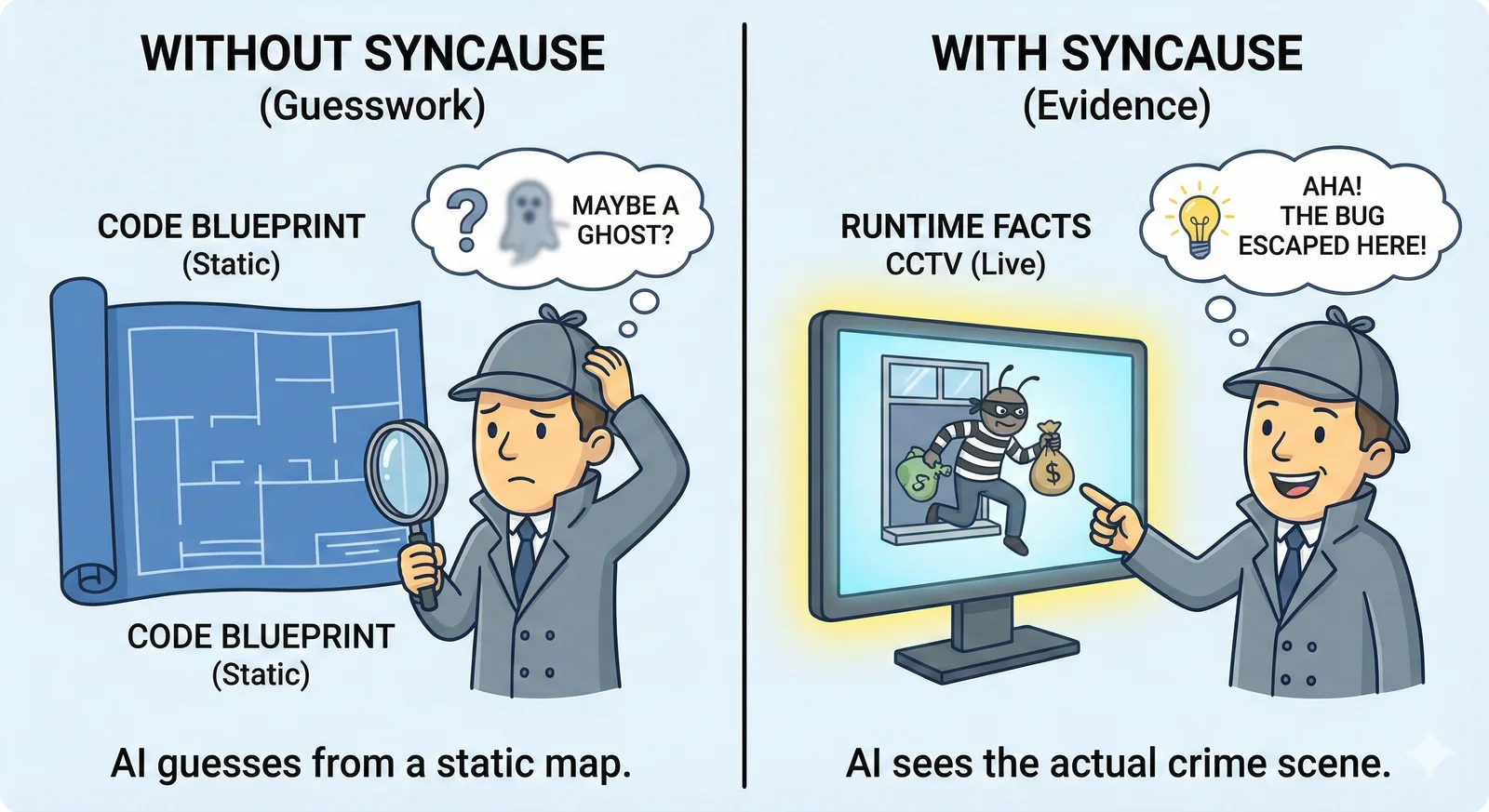
Today, we are releasing two key capabilities. Without altering your existing workflow, these tools empower Agents to automatically retrieve critical facts, fundamentally improving the accuracy of AI bug fixes.
Two Core Capabilities: Seamless Integration with AI Coding Tools
Syncause MCP Server
Leveraging the standard MCP Protocol, our server integrates seamlessly with mainstream AI coding tools like Cursor, Claude Code, and Codex. It injects real-time stack traces, variable snapshots, and function inputs directly into the Agent's context.
Eliminate the need to manually copy and paste logs. The Agent can actively query the "crime scene" of a bug, analyzing it just as easily as reading a local file.
Syncause Debug Skill
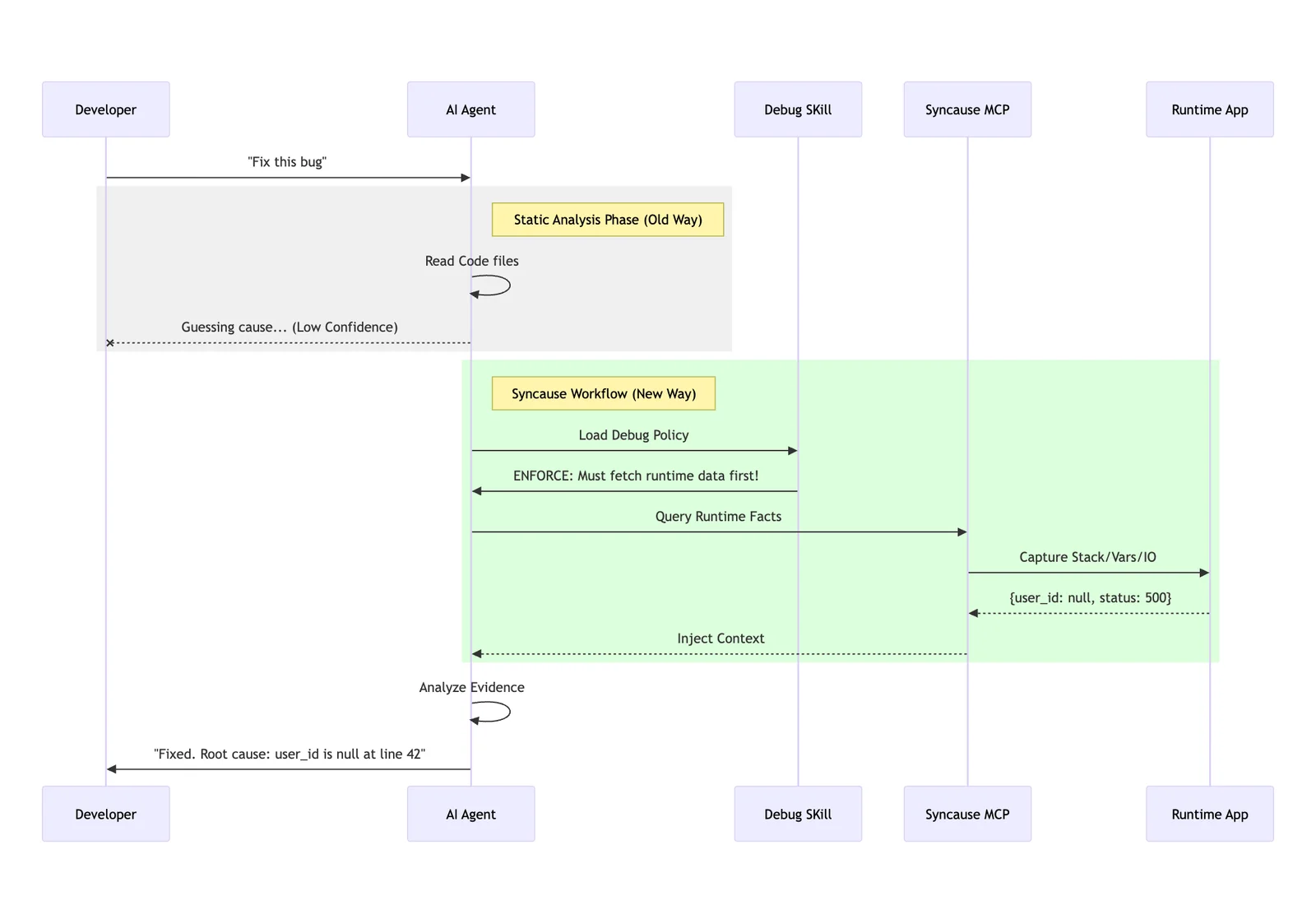
The Debug Skill adheres to the standard Agent Skills format. We have encapsulated senior engineering troubleshooting methodologies into a SKILL.md file. This acts as a mandatory playbook for the AI, strictly constraining its behavioral patterns:
- Mandatory Forensics: Before proposing a fix, the Agent must invoke MCP to fetch Runtime Facts.
- Evidence-Based Repair: When analyzing issues, the Agent must explicitly cite specific data points (e.g., "The Stack Trace indicates
user_idwas null at line 42..."). - Zero Guesswork: This fundamentally eliminates the hallucination of code caused by a lack of context.
The workflow for Debug Skill and MCP is as follows:
Core Value: Combating Hallucination with Runtime Facts
When AI falls into a cycle of ineffective patching, it often forces developers to prompt repeatedly. This happens because the AI lacks global visibility and business context, relying solely on static code and prompts to speculate on the cause.
1. Anchoring Fixes in "Ground Truth"
Many AI repair failures stem not from poor reasoning, but from missing input data. For any given bug, static code is only the tip of the iceberg; the critical information lies in the runtime:
- Control Flow: Which
if-elsebranch was actually executed? - Variable State: What were the exact values of key variables moments before the crash?
- I/O Data: What did the function inputs and return values actually look like?
Syncause injects these Runtime Facts directly into the Agent's context window, ensuring the Agent understands the complete scenario before writing a single line of code.
2. Eliminating "Copy-Paste" Friction
The traditional debug process is fragmented: Reproduce -> Breakpoints/Logs -> Screenshot/Copy -> Paste to AI -> AI asks clarifying questions -> Fetch more logs.
With Syncause Skill, you simply ask the question. The Agent automatically handles the rest: calling tools for verification, analyzing data, locating the root cause, and providing a fix.
Quick Start
Syncause Debug Skill is now open source. To integrate Runtime Facts into your AI programming workflow, follow these two steps:
- Get your API Key: Visit syn-cause.com/dashboard to get your free API Key.
- Install & Integrate: Configure the MCP Server and Skill for your preferred AI tool (Cursor, Claude Code, Codex, etc.).
👉 Detailed Installation Guide: https://github.com/Syncause/debug-skill
Once installed, simply chat with your Agent to activate it. Example prompts:
- "Help me debug why the coupon isn't applying."
- "Clicking the order shows no history. Use the debug skill to analyze the cause."
- "Please cite Runtime Facts as evidence before fixing."
Final Thoughts
If you are tired of AI "guessing its way through fixes" and the fatigue of trial-and-error, give Syncause two minutes. Integrate it into your daily AI coding tool and let Runtime Facts become the cornerstone of AI reasoning. Reduce guesswork, minimize rework, and make every fix precise and controllable.